Introduction
What is FlightRadar?
FlightRadar is a dedicated desktop flight-radar display. A 7-inch capacitive touchscreen driven by an ESP32-S3 renders a green "military radar" scope of the aircraft currently overhead, and a live detail panel for any aircraft you tap. It is designed to sit on a desk, shelf or windowsill and show local air traffic at a glance — no computer, phone or radio receiver required.
Unlike a traditional ADS-B receiver, FlightRadar has no SDR dongle, antenna or Raspberry Pi to configure. It pulls live aircraft positions over your WiFi from the community adsb.fi open-data network, centred on a home location that you set on the screen. Aircraft type, operator and route are then looked up on demand from adsbdb.com and shown in the detail panel.
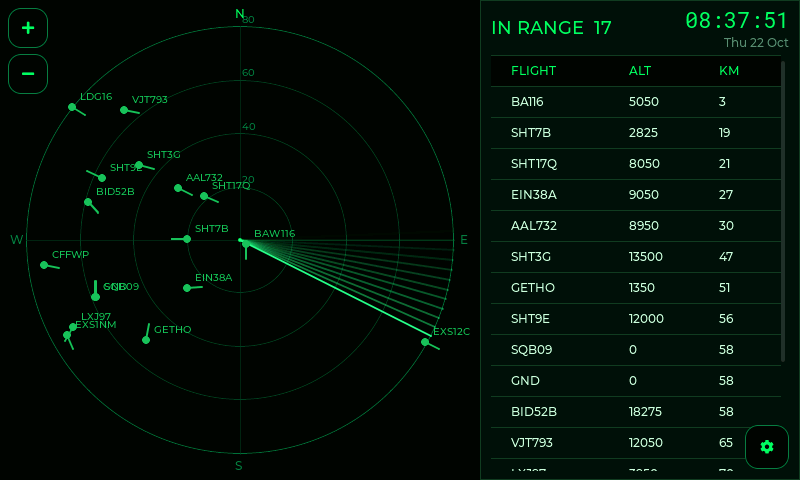
FlightRadar centred on Greenwich, London, with an 80 km range.
Key Features
7-inch Colour Touchscreen
800 x 480 pixel full-colour IPS LCD
Capacitive multi-touch panel drives the entire UI
Phosphor-green "radar scope" aesthetic, readable across the room
Optional 180° screen rotation for upside-down or shelf mounting
Overnight screen-off schedule (Night Mode) with touch-to-wake
Live Radar Scope
Square radar scope on the left half of the screen
Concentric range rings with kilometre labels and N/E/S/W compass marks
Rotating sweep line with a fading afterglow trail (classic radar look)
Aircraft shown as green blips with a short heading vector and a callsign label
Freshly-swept contacts brighten, then fade as they age — just like a real scope
Tap any blip to open its full detail panel
Aircraft Detail Panel
In-range list: every aircraft within range, sorted nearest-first, with flight, altitude and distance
Selected aircraft: callsign / flight number, ICAO24 hex, altitude, ground speed, heading, vertical rate, distance and bearing from home, and latitude / longitude
Enriched data (looked up automatically): aircraft type, registration, operator, origin → destination route, and an estimated time of arrival
No Receiver Required
Positions come from the internet — just a 2.4 GHz WiFi network and USB-C power
No SDR, antenna, Raspberry Pi or dump1090 to install
Range/zoom is adjustable from 5 km out to 250 km with the on-scope + / − buttons
Home Location Your Way
Set the radar centre as a Maidenhead grid locator (e.g.
IO91wm) or as raw latitude / longitudeEntered on-screen and saved — no re-flashing to move the device
Flight Alerts
Watch for up to 6 callsign, ICAO or flight-number prefixes (e.g.
BAW,VIR,BA109)Matching aircraft are highlighted on the scope so you don't miss them
WiFi Connectivity
Store up to 3 WiFi networks; the device connects to the best one in range on boot
On-screen WiFi setup with a network scanner and touch keyboard
Access-point setup fallback with a web page for phone/laptop configuration
Captive-portal setup page at
http://192.168.4.1
Over-The-Air Updates
Automatic firmware update check shortly after boot, then hourly
Secure HTTPS download from the TopBytes update service
On-screen progress bar during the update
Manual "check for update" from the on-screen settings
Requirements
To Run FlightRadar
A 2.4 GHz WiFi network with internet access (the ESP32-S3 does not support 5 GHz)
A quality 5 V USB-C power supply rated at 1 A or more
That's it — no amateur-radio licence, receiver or antenna is needed.
How It Works
FlightRadar operates in a few concurrent stages:
Power On: The 7-inch LCD lights up and the device loads its saved settings from non-volatile storage.
Setup or Connect: If no WiFi is configured, an on-screen WiFi setup takes over (or the device offers an access-point setup page for your phone). Otherwise it joins your saved network.
Locate: The scope is centred on your configured home location (Maidenhead grid or latitude/longitude).
Fetch & Plot: The device polls the adsb.fi network for aircraft within range of home, converts each position to a range and bearing, and plots it on the scope.
Interact: Tap a blip to open its detail panel; the device looks up the aircraft type, operator and route in the background and fills them in.
Typical Use Cases
Desk Ornament with a Purpose
Keep FlightRadar on your desk or windowsill and watch the traffic overhead — a living, glowing radar scope of your local sky.
Near an Airport or Flight Path
If you live under an approach or a busy corridor, set a short range (5–20 km) and watch aircraft line up on final. Tap one to see the operator and route.
Plane-Spotting Companion
Add the airlines or flights you're watching for as alerts. Matching aircraft are highlighted on the scope, and the detail panel gives you the type, registration and route.
Learning Tool
A simple, tangible way to see how ADS-B, bearings and ranges work — and which airlines and aircraft types pass over you at different times of day.
Design Philosophy
Zero-Fuss
The device should work out of the box with nothing but WiFi and USB-C power. No receiver, no antenna, no companion computer.
Touch-First
Every common task — WiFi, location, range, alerts, timezone, night mode — is doable on the screen. There is no "configuration mode" to enter; just tap what you want to change.
Readability
The radar aesthetic is chosen for glance-ability: a bright sweep, fading contacts, clear rings and a high-contrast detail panel readable from across the room.
Reliability
The device recovers automatically from WiFi drops and feed hiccups, and keeps the scope alive without user intervention.
What's Next?
Now that you know what FlightRadar is and what it does, proceed to Getting Started to power it on and complete the first-time setup.